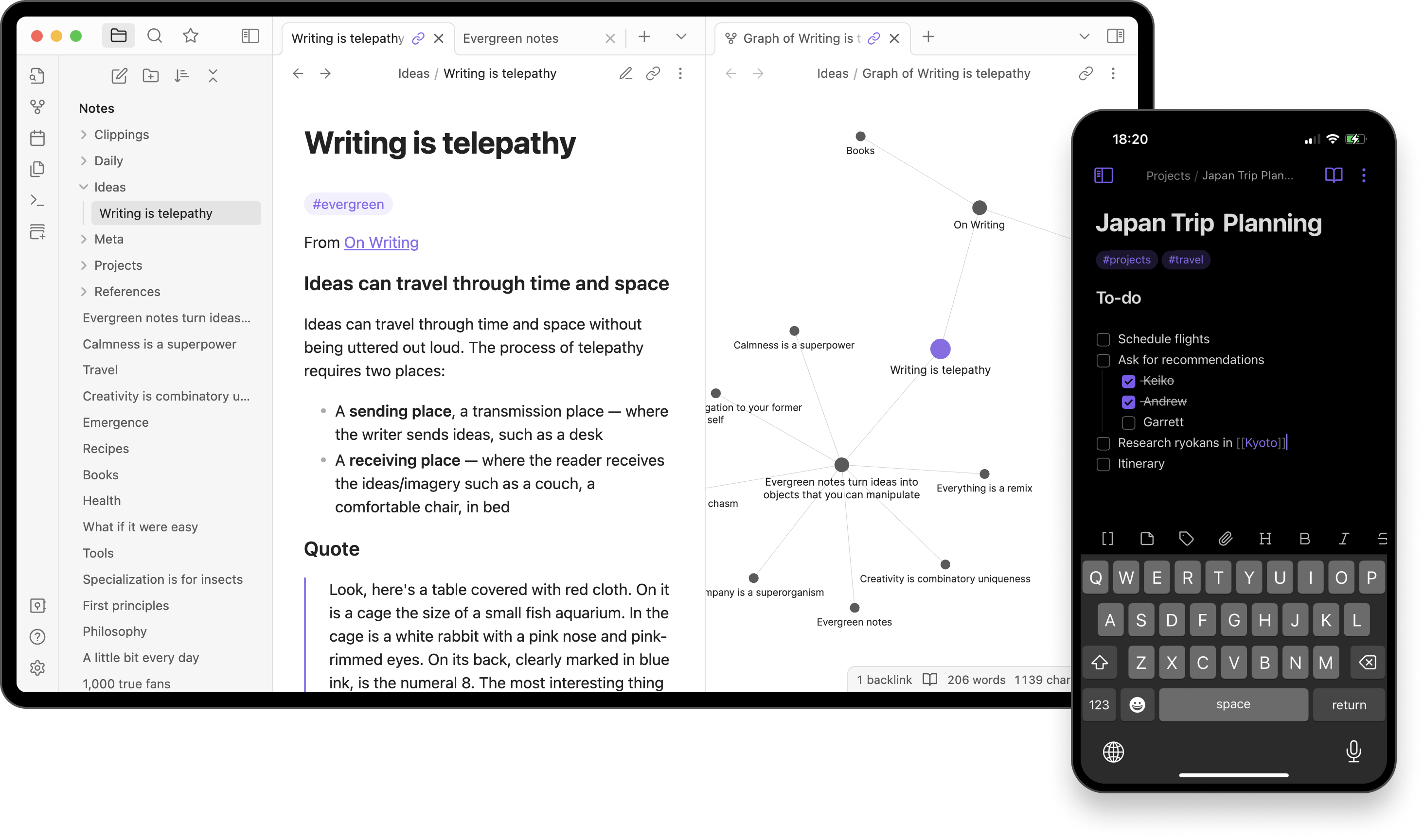
Obsidian- Sharpen Your Thinking with a Local-First Knowledge Base
A personal knowledge management app that turns your notes into a connected web of ideas.
Obsidian: Sharpen Your Thinking with a Local-First Knowledge Base
Do you have scattered notes, fragmented ideas, or a fear of cloud lock-in? Obsidian aims to fix that. It’s a Markdown-based note-taking app that stores your notes as local files—so you truly own your data. Then it connects those notes into an interlinked web. In short: Obsidian is more than a note-taking app—it's your second brain.
Why Obsidian Stands Out
Obsidian combines technical flexibility with powerful productivity tools. Here's what makes it special:
-
Graph View
Visualize your notes and their connections as a graph. It’s like a mind map that grows organically as you write. -
Local-First Storage
Your notes are plain Markdown files on your device—open, portable, and private. No internet required. -
Plugins & Themes
A massive ecosystem of community plugins: Kanban boards, spaced repetition, calendar views, and more. -
Daily Notes & Templates
Capture thoughts, logs, or tasks each day with pre-defined templates. -
Linking & Backlinks
Use[[wikilinks]]to connect notes and automatically build backlinks, making navigation effortless.
Markdown Power Meets Productivity
⚙️ Warning: Technical Details Ahead (but they're cool!)
Obsidian isn’t just pretty—it’s plain-text power. Every note is a .md file, which means:
- You can open/edit them with any text editor.
- They play well with Git, VS Code, or static site generators.
- Your data is future-proof, portable, and 100% yours.
But at the same time, Obsidian is a top-tier PKM (Personal Knowledge Management) tool. As your network of notes grows, you begin to think in links. You stop losing ideas. Instead, you build a knowledge system that mirrors how your brain actually works.
Obsidian vs. Notion vs. Evernote
| Feature | Obsidian | Notion | Evernote |
|---|---|---|---|
| Storage | Local .md files |
Cloud (Notion servers) | Cloud (Evernote servers) |
| Offline Use | Full offline support | Limited offline | Good offline support |
| Data Format | Open (Markdown) | Proprietary | Proprietary |
| Linking | Wikilinks + backlinks + graph | Basic linking | Basic linking |
| Plugins | Thousands (community) | Very limited | Very limited |
| Collaboration | Not built-in (single-user focused) | Real-time collaboration | Shared notebooks |
| Graph View | ✅ Yes | ❌ No | ❌ No |
| Learning Curve | Moderate (Markdown + setup) | Low (WYSIWYG) | Low |
| Platforms | Windows, macOS, Linux, iOS, Android | Web, desktop, mobile | Web, desktop, mobile |
| Price | Free (core), Paid (Sync/Publish) | Free tier + Paid plans | Free tier + Paid plans |
Things to Consider Before Switching
-
Learning Curve
Obsidian’s simplicity is powerful—but it’s not drag-and-drop. If you’re used to Notion or Evernote, Markdown may take some getting used to. -
Local File Management
You're in control of your data. That’s great—but you’re also responsible for syncing and backup unless you use Obsidian Sync. -
Plugin Dependence
Many advanced features come from plugins. That’s amazing flexibility, but it means you might need to experiment and update things manually. -
Solo Use Only
Obsidian is built for individuals, not teams. If real-time collaboration is a must, you might want to combine it with Git or look elsewhere.
Ready to Sharpen Your Thinking?
Obsidian isn’t just a note-taking app—it’s a mindset. A commitment to owning your thoughts, linking your knowledge, and building a system that grows with you.
If you're serious about knowledge and tired of cloud lock-in, Obsidian might just change the way you think.